Contact Area Analysis(标签接触面积分析)
Contact Area Analysis - User Manual
Dragonfly Prototype Apps · Analyze Contact Areas Between Labels...
版本 Version 1.0 · 2026-09-01
第一部分 中文手册
目录
1. 简介
2. 两种接触定义
3. 使用方法
4. 工作簿内容
5. 环境需求
1. 简介
分析已做标签的 MultiROI 中每个标签与其它标签的接触情况:每对标签的接触面积、每个标签的接触总面积与配位数(接触伙伴数量)、表面积与接触占比,以及全部接触结果的统计汇总。
全部数值保存为一个 .xlsx 工作簿(Settings、Per-label、Pairs、Matrix、Statistics 五个工作表),并可同时生成基于同一结果的 .docx 报告——总览、统计、直方图与 Top 表格。
不创建、不修改会话中的任何对象。 本插件只读取所选 MultiROI,并把文件写入你指定的文件夹。
2. 两种接触定义
面接触——仅共享面的体素计为接触;接触面积为共享面面积的精确总和(体素化界面,无估计)。
邻近接触——分辨率、体素尺寸和分割精度可能使实际接触的两个物体之间留下微小间隙。此模式下,两标签任意两个体素中心距离 ≤ 阈值(默认 2 个体素步长;数值可改,单位也可切换为 µm)即计为接触。判据按标签对通过欧氏距离变换精确计算。
邻近接触的面积按穿越间隙带的网格线计数:到两标签距离之和 ≤ 阈值的未标记体素构成两体之间的透镜状间隙带;沿每条网格线,标签 i 与标签 j 直接相邻、或仅被间隙带体素隔开的每一处,计一个面。平整间隙精确计数;阶梯/曲面状的间隙列要等间隙带沿网格线桥接后才计入,因此是保守下界,且不同阈值下测得的面积不可直接比较。
- 阈值取 1 时,邻近模式与面接触模式完全一致,两种定义的结果可直接对比。
- 纯棱/点接触(中心距 √2、√3)是线/点接触:列入接触对并给出最小中心距,但面积为 0——这是几何事实,明示而不掩盖。
⚠ 各向异性体素配合体素步长单位时,各轴的物理容差不同,结果会附带明确警告;如需各向同性的物理容差,请把阈值单位切换为 µm。
3. 使用方法
1. 选择已做标签的 MultiROI(发布新对象后点「刷新」)。面板显示标签数、尺寸和体素尺寸;4D 数据可选时间步。
2. 选择接触定义:「面接触」,或「邻近接触」并设阈值(默认 2 个体素步长——面板会显示各轴的物理等效值;单位可改为 µm)。
3. 选择输出文件夹和文件名;保持勾选「.docx 报告」可在工作簿旁生成报告。
4. 点「开始分析」。进度条显示进度,「取消」可中止;完成后点「打开输出文件夹」查看结果。
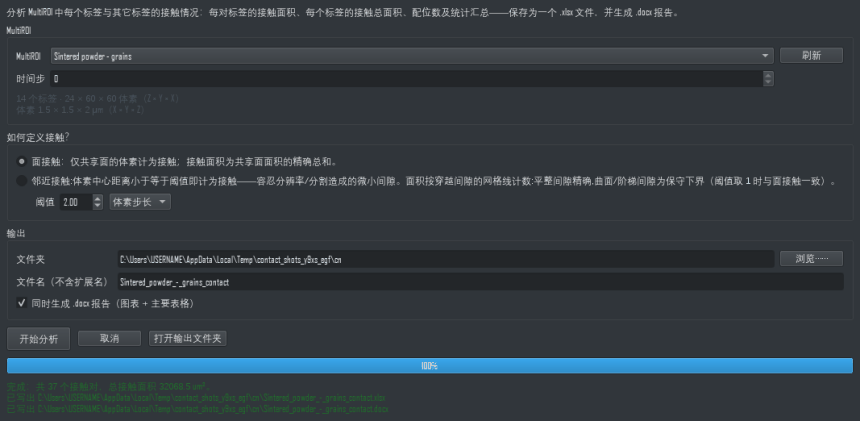
插件面板:选择 MultiROI、选定接触判据,随后写出的工作簿同时包含网格线穿越面积与相互接触的标签对数量。
4. 工作簿内容
- Settings——数据来源、接触定义、阈值、体素尺寸,以及本次运行产生的全部警告。
- Per-label——每个标签的体素数、体积、表面积、接触总面积、接触占比、配位数和伙伴列表。
- Pairs——每个接触对一行(标签 i、标签 j、名称、接触面积;邻近模式下还有最小中心距),按面积排序。
- Matrix——对称的 标签 × 标签 接触面积矩阵(超过 256 个标签时省略;Pairs 表始终包含全部数据)。
- Statistics——接触对面积统计(数量、总和、均值、标准差、最小、中位、最大)和配位数统计。
5. 环境需求
无需安装、联网、GPU 或虚拟环境——进程内 PyQt6 + numpy + scipy + openpyxl + matplotlib,全部为 Dragonfly 自带。需要会话中有已发布、已做标签的 MultiROI;体素尺寸无法读取时拒绝分析。支持数千标签规模(包围盒预筛 + 逐对精确计算)。
Part II English Manual
Contents
1. Introduction
2. The two contact definitions
3. How to use it
4. What the workbook contains
5. Requirements
1. Introduction
Analyzes how every label of a labelled MultiROI touches the other labels: the contact area of each label pair, each label's total contact area and coordination number (how many partners it touches), surface area and contact fraction, and summary statistics over all contacts.
Everything is saved into one .xlsx workbook (sheets: Settings, Per-label, Pairs, Matrix, Statistics) and, optionally, a .docx report built from the same results — overview, statistics, histograms and top tables.
Nothing is created or modified in the session. The plugin reads the selected MultiROI and writes files where you point it.
2. The two contact definitions
Face contact — only voxels sharing a FACE count as contact; the contact area is the exact sum of the shared faces' areas (a voxelized interface, no estimate).
Proximity — resolution, voxel size and segmentation precision can leave a thin gap between bodies that physically touch. In this mode two labels count as in contact when any two of their voxel centres lie within the threshold (default 2 voxel steps; editable, or switch the unit to µm). The criterion is computed exactly, per pair, from Euclidean distance transforms.
The proximity contact area is a grid-line crossing count over the true gap band: unlabelled voxels whose distances to the two labels sum to ≤ the threshold form a lens between the bodies, and along every grid line, each place where a run of label i and a run of label j touch directly or are separated only by lens voxels contributes one face. Flat gaps are counted exactly; staircase/curved gap columns join the area only once the lens bridges them along a grid line, so those areas are a conservative lower bound, and areas measured at different thresholds are not comparable.
- At threshold 1 the proximity mode equals face mode EXACTLY, so results under the two definitions are directly comparable.
- A pure edge/corner touch (centre distance √2 or √3) is a line/point contact: it is listed as a contact pair with its minimum centre distance, but its area is 0 — the geometric truth, stated rather than hidden.
⚠ With anisotropic voxels and a threshold in voxel steps, the physical tolerance differs per axis; the result carries an explicit warning. Switch the threshold unit to µm for an isotropic physical tolerance.
3. How to use it
1. Pick the labelled MultiROI (press Refresh after publishing a new one). The panel shows its label count, size and voxel size; for 4D data pick the time step.
2. Choose the contact definition: Face contact, or Proximity with a threshold (default 2 voxel steps — the panel shows the physical equivalent per axis; the unit can be µm instead).
3. Pick the output folder and base file name; keep .docx report ticked to get the report next to the workbook.
4. Press Run analysis. A progress bar tracks the run and Cancel stops it; when it finishes, Open output folder shows the results.
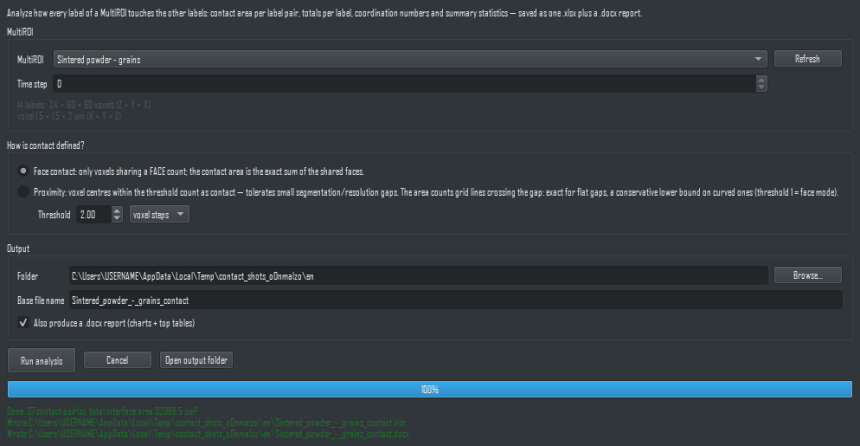
The panel: pick the MultiROI, choose the contact definition, and the workbook is written with both the grid-line crossing area and the count of touching label pairs.
4. What the workbook contains
- Settings — the source, contact definition, threshold, voxel size, and every warning the run produced.
- Per-label — for each label: voxel count, volume, surface area, TOTAL contact area, contact fraction, coordination number, and the partner list.
- Pairs — one row per contacting pair (label i, label j, names, contact area; in proximity mode also the minimum centre distance), sorted by area.
- Matrix — the symmetric label × label contact-area matrix (omitted above 256 labels; the Pairs sheet always carries everything).
- Statistics — pair-area statistics (count, total, mean, std, min, median, max) and coordination-number statistics.
5. Requirements
No install, no internet, no GPU, no venv — in-process PyQt6 + numpy + scipy + openpyxl + matplotlib, all bundled with Dragonfly. Needs a published, labelled MultiROI; the analysis is refused when the voxel size cannot be read. Scales to thousands of labels (bounding-box prefilter, exact per-pair computation).